

I spend a lot of time in the admin areas of lots of WordPress sites, built by different web designers, each with their own collection of plugins. The first thing I notice when logging in to one of these, is that important notifications are buried under a ton of upsells, nags & noise in the admin notification area.
Let’s explore some of these nags to see why they might be more dangerous for your site than you think. Then we’ll do something about them.
Why site owners stop reading admin notifications
The crux of this whole thing is that the WordPress admin notification area becomes so saturated with noise, genuinely useful notifications are lost. Site owners glaze over the section and scroll down to the admin content they actually need. The nags pleading for you “leave a review for our amazing plugin… maybe later? please…” are just admin spam.
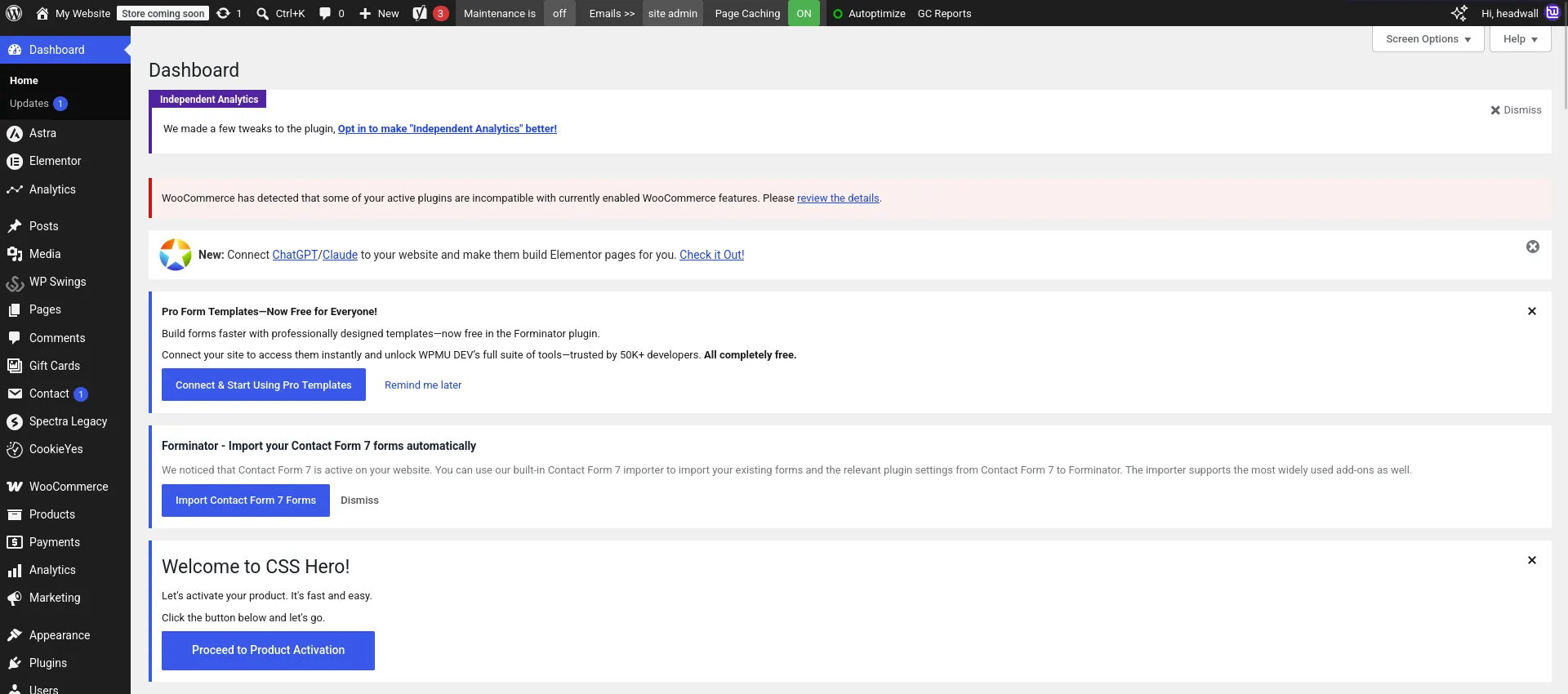
Often there will be something important tucked away in here related to an overnight update, like…
The most recent version of plugin ABC needs to update the database schema. Click to update now.
Missing an admin notice (that requires action) can harm your website’s functionality and lead to problems down-the-road.
Widget news feeds: admin page-speed and privacy
Another thing a lot of plugins do is install an admin dashboard widget. They look harmless enough, showing a list of “news stories” related to the developer. The WordPress admin dashboard can be sluggish at the best of times.
When WP makes a call to a remote server using wp_remote_get it sets the User Agent to be that of your WP version and your site’s URL. So every time your admin dashboard reaches out to the developers’ server to fetch the latest “news stories”, they’re capturing your site’s URL and which version of WordPress you’re running.
This is an opportunity to remove widgets that make a “call home” (to fetch news content), to pick up a bit of data privacy, and improve admin page-load times.
Telemetry and data egress
While building this tool, we found some data trackers that collect an excessive amount of data:
WP Desk
POSTed weekly:
domain_hash, unique_hash, email_hash, url, email, wp, server, settings, theme, active_plugins, inactive_plugins, template_overrides, users (count), orders (count), orders_per_month, shipping_country_per_order, products (count), number_of_variations, gateways, shipping_methods, shipping_methods_by_title, shipping_zones_by_name, number_of_shipping_classes, license_emails, admin_user_agents, jetpack_connected, jetpack_version, jetpack_is_staging, connect_active, connect_installed
Brainstorm Forcebsf-analytics collects:
graupi_version, domain_name, php_os, server_software, mysql_version, php_version, php_max_input_vars, php_post_max_size, php_max_execution_time, php_memory_limit, zip_installed, imagick_availabile, xmlreader_exists, gd_available, curl_version, curl_ssl_version, is_writable, wp_version, user_count, posts_count, page_count, site_language, timezone, is_ssl, is_multisite, network_url, external_object_cache, wp_debug, wp_debug_display, script_debug, active_plugins, active_theme, active_stylesheet, admin_email
That’s your admin email address, domain and active plugin list going to external developers… on any site where someone clicked “yes” on the consent popup, which is exactly what those nags are for. I have a strong dislike for this sort of quiet data-slurping. It’s not good practice, in my opinion.
Tidying up the admin mess
I wanted to create something easy to use, like a “must-use” plugin. A single PHP file that doesn’t risk breaking anything.
Core requirements:
- Fire and forget. Install the PHP into
mu-pluginsorrequireit in your child theme, and that’s it. No settings page and no database writes. - Use built-in WordPress functions to just “unhook” admin notices.
- Do not unhook legitimate admin notifications – only the noise.
- This is not a tool for defeating, bypassing or nullifying premium software.
- A licence activation/renewal notice is operational information, not a nag. We need to leave those in place.
- Don’t touch WooCommerce. I have a separate project for removing the bloat from WooCommerce
- Remove admin dashboard widgets that make outgoing requests to remote servers.
As of September 2026, this is what we’re cleaning up…
| Nagware | Notes |
|---|---|
| Essential Addons for Elementor | Promo banner, 2 widgets, seasonal pointer |
| YITH (all plugins) | 2 RSS widgets + their asset enqueue |
| WP Desk | Upsell widget content fetch Opt-in notice, deactivation survey, activation redirect, weekly payload |
| Brainstorm Force (Astra/Spectra) | Usage-tracking payload |
| ThemeIsle (all plugins) | “WordPress Guides/Tutorials” widget + 2 RSS fetches |
| CookieYes | Review nag and “Unlock advanced features” SaaS pitch |
| WebToffee (all plugins) | AccessiYes cross-promo banner |
| Elementor | Multiple promotional notices, “Build more with Elementor Pro” banner + Black Friday + Birthday, plus dequeued assets |
| Forminator | review nag |
| Premium Addons for Elementor | Review nag, Angie notice, Connect-AI upsell |
| WP Swings | Seasonal offer banners |
| WPB Product Slider | review nag |
The project is totally free, and hosted on Github: https://github.com/headwalluk/wp-nag-cleanup
While building this, we spotted a pattern. Larger plugins such as Yoast were noticeably better behaved. Sure, they would show upsell nags, but they would only do so on their own admin pages. The big plugins tended not to pollute the main admin dashboard unnecessarily. That was a pleasant surprise.
The main culprits are the middle-tier freemium plugins. You’ll get a free version from the WordPress plugin repo, only to be hit by repeated nags and dashboard widgets that call home to the developers.
Here are all the plugins I’ve analysed so far:
https://github.com/headwalluk/wp-nag-cleanup/tree/main/docs/plugins
Install it on your site
The result is a project anyone can use on their WordPress site. Just grab the PHP file:
https://github.com/headwalluk/wp-nag-cleanup/blob/main/headwall-nag-cleanup.php
Save that into your site’s mu-plugins/ directory, and that’s it. You should see fewer nags and admin noise from now on.
This is an active project. I expect it’ll grow over Sep-Dec 2026, then settle down to a fairly steady state. So it’s worth checking on the Github page from time-to-time to see if there’s a new version available.
Important: If you host your site with Headwall Hosting, you don’t need to take any action – WP Nag Cleanup is built in to our hosting provision.