
Most of my hosted WordPress sites get two-factor authentication enabled as standard. That’s not negotiable: admin accounts without a second factor are an incident waiting to happen. The problem is that most 2FA plugins are built for users who are happy to install an authenticator app, scan a QR code, and manage time-based tokens. That’s fine for developers. But it’s a challenging UX for a lot of pople, with less of a technical background.
Quick 2FA uses email for verification. There’s no app to install, no QR code to scan. You log in, WordPress sends a code to your email address, you type it in. That’s it. Most clients already understand this pattern from online banking.
There was one other requirement: it had to play nicely with everything else. My hosting setup uses WP-CLI for maintenance, REST API calls for various integrations, and Application Passwords for a few client tools. I didn’t want a 2FA plugin that broke any of that. So Quick 2FA only intercepts browser-based admin access. Everything else passes straight through.
What it does
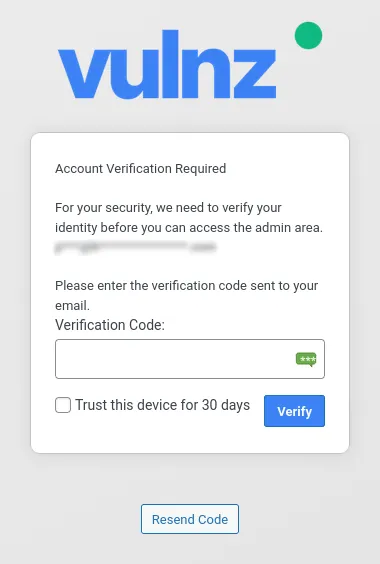
Quick 2FA guards the WordPress admin area with email-based two-factor authentication. When a covered user logs in and navigates to the admin area, they’re redirected to a verification page where they enter a code that’s been sent to their email address. Once verified, they’re through. Depending on how you’ve configured trusted devices, they may not need to verify again for days or weeks.
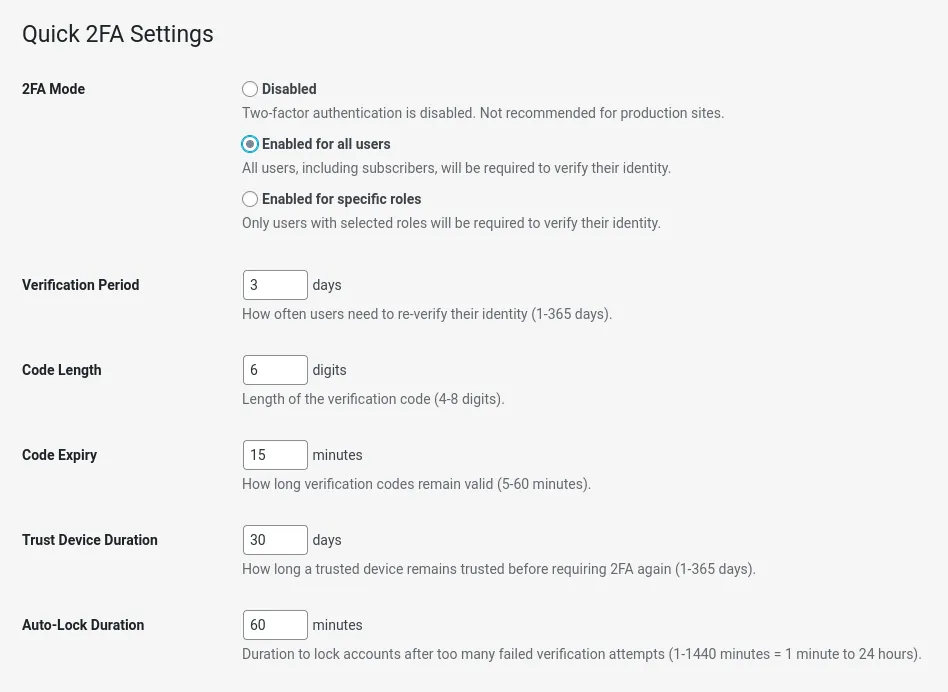
- Three coverage modes: Protect all admin users, specific roles only, or disable 2FA temporarily without uninstalling the plugin
- Trusted devices: Once verified on a device, users can bypass verification for a configurable period (default 30 days). Can be disabled if you’d rather verify every session
- Account lockout: After five failed code attempts, the account locks for a configurable duration (default 60 minutes). Prevents brute-forcing even with email access
- Password reminders: Optionally prompt admin users to update old passwords. Configurable period, with a cooldown to avoid nagging on every page load
- Configurable codes: Code length (4-10 digits, default 6), expiry window (5-60 minutes, default 15), and a rate limit on how many codes can be requested per 15-minute window
- Email customisation: From name, from address, and subject are all configurable from the settings page
- Security event log: Keeps the last 50 events per user: code requests, successful verifications, failed attempts, lockouts
- WP-CLI commands: Manage 2FA from the command line, including an emergency disable if you get locked out of your email
- GitHub auto-updates: The plugin updates itself via a bundled GitHub updater, polling the release API every 12 hours
No authenticator app required. No QR codes. No app store. It “just works”
How it works
When a covered user hits any admin page, the plugin checks whether they’ve been verified recently. “Recently” depends on your configuration:
- With trusted devices enabled (the default): the plugin checks whether the current device has been trusted. Trusted devices are identified by a fingerprint derived from the user’s IP address and browser user agent, stored as a hashed value in user meta. Unknown devices always trigger verification, regardless of when the user last verified on another device.
- With trusted devices disabled: it falls back to a time-based check. If the user hasn’t verified within the configured period, they’re prompted again.
If verification is needed, the plugin redirects to a custom page on the WordPress login URL (wp-login.php?q2fa=verify). A new code is generated using PHP’s random_int(), hashed with wp_hash_password(), and stored in user meta alongside a timestamp and attempt counter. The plain-text code is sent to the user’s registered email address and then discarded. Only the hash is kept.
On submission, the code is verified against the stored hash using WordPress’s constant-time comparison, and the attempt counter is incremented on failure. Hit the limit, the account locks.
Verification is skipped entirely for:
- REST API requests
- AJAX calls
- WP-CLI
- Cron jobs
- XML-RPC
- Application Password authentication
- The User Switching plugin (switch users without re-verifying)
Existing automations, API integrations, and management tools keep working without interruption.
Customising the verification pages
The text shown on the verification and password reminder pages can be overridden via filters. Useful if you want to add a support contact or a note about your security policy:
// Customise the intro text on the verification page
add_filter( 'quick2fa_verify_intro', function( string $intro ): string {
    return 'For your security, please enter the code sent to your email address. '
         . 'If you need help, contact <a href="mailto:support@example.com">support</a>.';
} );

// Customise the intro text on the password reminder page
add_filter( 'quick2fa_password_intro', function( string $intro ): string {
    return 'Your password is more than 90 days old. We recommend changing it regularly.';
} );
The filtered strings are passed through wp_kses() with a tight allow-list: <a>, <b>, <br>, <em>, <i>, <span class>, <strong>. Anything outside that list is stripped silently.
Security and privacy
The following are stored as user meta:
- Hashed verification codes (never plain-text)
- Verification timestamps
- Failed attempt counts
- Account lock timestamp (when applicable)
- Trusted device fingerprints (hashed IP + user agent)
- Security event log, capped at 50 entries per user
IP addresses appear in the event log for incident investigation. Worth noting for GDPR purposes, although data stay on your server. Nothing is sent to external services.
The GitHub updater makes a single HTTP request to api.github.com/repos/headwalluk/quick-2fa/releases/latest on a 12-hour cache, nothing more.
The verification page masks the user’s email address to avoid disclosing it to anyone who might have access to the browser.
Technical notes
No new database tables. All state data are stored in user meta and WordPress options. Transients handle short-lived data (rate limit windows, return URLs after verification) and are cleaned up on deactivation.
The plugin works as a standard plugin or as a must-use plugin. When installed as Must Use plugin, the activation hook doesn’t fire, so defaults are initialised on the first admin_init run instead.
The GitHub updater loads only in admin and cron contexts. It’s not part of the front-end request stack.
Required:
- WordPress 6.0 or later
- PHP 8.0 or later
Bundled translations: German, Greek, English (GB), Spanish, French, Italian, Dutch, Polish. These are machine-translated; if you want to improve the translations for your language, leave a comment below, or get in touch directly.
What’s next
The trusted device fingerprint (IP + user agent) works well for most people but can cause unnecessary re-verification if users switch between mobile and Wi-Fi frequently. A cookie-based approach might be more stable, though it needs some thought around shared-device scenarios.
TOTP support (proper authenticator app codes and QR Codes) is on the list for users who want it. The email flow covers 90% of cases, but some users would rather not rely on emails for identity verification.
I’m also considering adding support for Twillo, so we can authenticate via SMS codes.
For now, the plugin does one thing well: gets 2FA onto WordPress admin accounts without making life difficult for the people who use them.