

A client wanted to start selling venue admission tickets on their WooCommerce site. But a core requirement is that they didn’t want to use the standard WooCommerce single-product template. They wanted a proper landing page using Gutenberg Blocks, with a layout suited to ticket sales. No featured image, attribute tabs or sidebar. Just a clean, purpose-built page with a solid UX.
The catch was that they still needed WooCommerce to handle the cart, checkout, and structured data. Stripping out the product template entirely would break the schema.org JSON-LD that search engines use to understand the product, and it would break every link across the site that pointed to the product URL.
What the plugin does
- Page-as-product: associate any published Page or Post with a WooCommerce product via a meta box on the product editor.
- Permalink override: every link WordPress and WooCommerce generates for that product (menus, shop loop, related products) resolves to your chosen page instead of
/product/.... - SEO structured data: injects WooCommerce’s product schema.org JSON-LD into the substituted page, so search engines still see a product.
- Add to cart by SKU:
?add-to-cart=<SKU>works alongside the standard numeric product ID. Failed to determine the productshortcode: drop a themed add-to-cart button anywhere in the page content.
The product exists normally in WooCommerce. We’re only replacing its front-end presentation.
Installation
- Download and install the plugin’s zip file, then activate it.
- Edit a WooCommerce product, find the Fancy Product Page meta box, and choose the Page or Post to use as its front-end.
- Update the product.
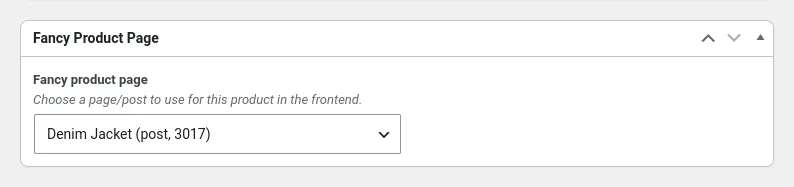
That’s it. Links generated for the product now resolve to your page.
Building the page
Create a normal WordPress Page and design it however you like. The block editor, GenerateBlocks, Elementor, Astra/Spectra… anything works, because it’s just standard WordPress content. Publish the page before associating it with the product.
To add a buy button, use the [add_to_cart_btn] shortcode:
[add_to_cart_btn id="123"]
Or by SKU, which is often more convenient if you’re building the page before you know the product ID:
[add_to_cart_btn sku="TICKET-ADULT" qty="1"]
The shortcode renders a themed “Add to cart” link with the product’s display price. If qty is greater than 1, the quantity and adjusted price are shown in the button.
Verify it’s working properly
Once you’ve associated the page with the product:
- Visit the shop or any page that links to the product — the link should land on your page, not the standard
/product/...URL. - View the page source and look for an
application/ld+jsonblock. It should describe the product with@type: Product— that’s WooCommerce’s structured data being injected into your page. - Add the product to the cart from your page and confirm it reaches checkout normally.
What it doesn’t do
The original /product/... URL still resolves to WooCommerce’s standard template. There’s an optional 301 redirect in the code that would send visitors from the canonical product URL to the fancy page, but it’s not enabled in this release. For most use cases this isn’t a problem – the plugin rewrites all generated links, so visitors rarely end up on the old URL unless they’ve bookmarked it directly.
The plugin has no settings page. Configuration is per-product via the meta box.
For developers
If you need to allow a custom post type to be used as a fancy product page, there’s a filter for that:
/**
 * Add your own post types as being eligible for fancy product pages.
 */
add_filter( 'fancy_product_page_post_types', function ( $post_types ) {
    $post_types[] = 'landing';
    return $post_types;
} );
There’s also a theme-facing helper if you need to conditionally render something based on whether a product has a fancy page assigned:
if ( has_fancy_product_page( get_the_ID() ) ) {
    // do something
}
The plugin self-updates from its GitHub releases, so once it’s installed, new versions appear in Dashboard → Updates like any other plugin. Update checks can be disabled with the fancy_product_page_updater_enabled filter if you’d rather manage updates manually.