
I’m a website hosting guy based in Reading (UK), working mostly with individual professionals, digital agencies and e-commerce retailers. But hosting is more than just setting up Linux servers with PHP and WordPress on them. To host WordPress websites properly means understanding databases, caching, PHP, HTML and real-world user requirements. A question that pops up a lot these days is…
Do we need to worry about SEO now everyone’s using AI chatbots?
In short, the answer is “yes”. But there’s more to it than that, and AI can be part of the solution too.
A guide to using AI to help improve & refine the technical SEO (JSON schema) for any web page on a WordPress/WooCommerce site.
The two types of SEO: Technical, and On-page
I’m a technical chap, so technical SEO is something I can get my teeth into. We’re talking about structured data that describe content.
The on-page stuff is super important – that’s what lands in front of human readers as rendered content. But if the technical components aren’t done properly, the content runs the risk of being ignored by the crawlers, regardless of how good it is.
So let’s have a look at the one most people forget about – technical SEO.
JSON Schema is the missing ingredient
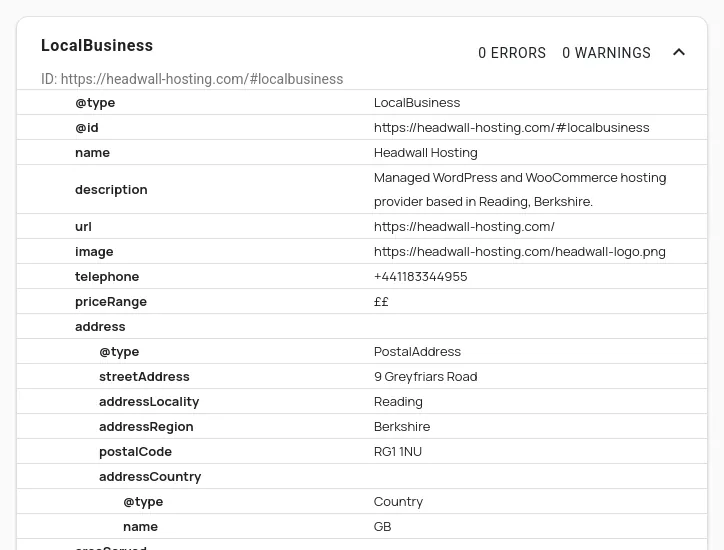
From the experience of working with WordPress business users in and around Reading, the most common missing component is the LocalBusiness schema (structured data). This is a bit of code that describes the business represented by a web page or web site. It includes the address, usually a latitude & longitude, and things like contact details. This is a small chunk of data (code) that tells search engines about the website’s business. When it’s done right, the crawlers will “see” something like this when they look at your website’s front page…
Running your website through a tool like Semrush or AHrefs won’t usually tell you if something like this is missing from your site. It may tell you if it’s present, but broken. But it won’t tell you it’s missing.
AI tools are great for this sort of targeted website refinement.
Fire up your chatbot of choice, and try a prompt along the lines of this…
I want to make sure my WordPress website has the proper LocalBusiness JSON schema on it. Examine the front page of my website https://example.com/ and my contact page. Does my website already have LocalBusiness schema on it? If not, let’s create a JSON snippet I can paste into a CustomHTML Block. The goal is for the website to perform better in “near me” searches.
Your AI agent will run the analysis, then give you a code block you can copy-and-paste. Look through the code snippet to see if everything is right. If something is wrong, just tell your agent how to fix it, and it will create an updated code snippet. The important things to look for are the address/region. If you’re working from home and don’t want to advertise your actual home address, just leave out the street address. But try to give as much data as you’re comfortable – anything to help with the “…near me” searches.
Once you’ve got your code snippet, edit your site’s front page and add a Custom HTML block. Then you simply paste your code snippet as HTML and hit Update:
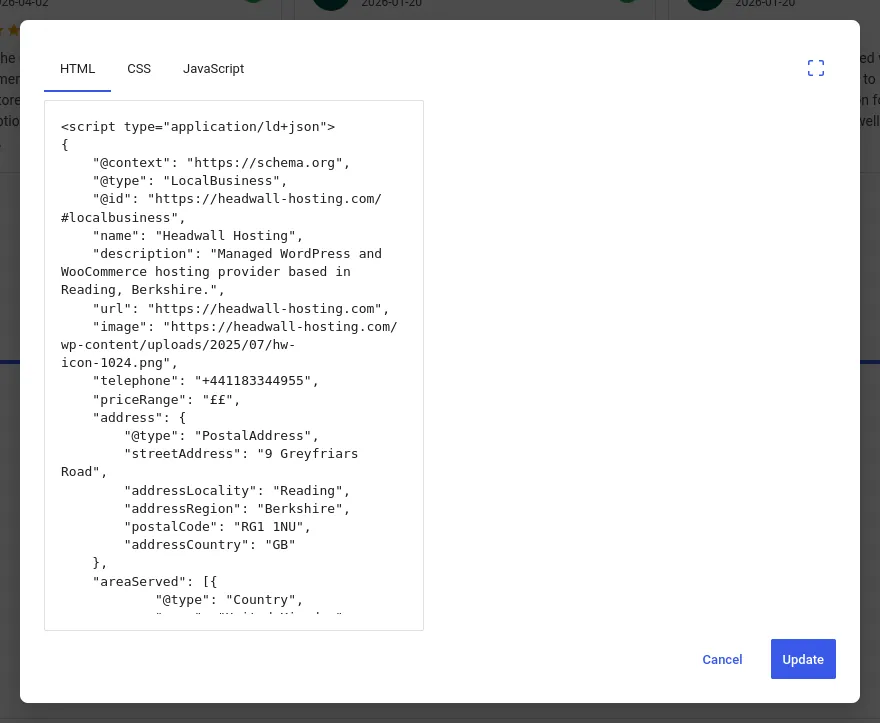
Paste your AI-assisted LocalBusiness schema as a Custom HTML block
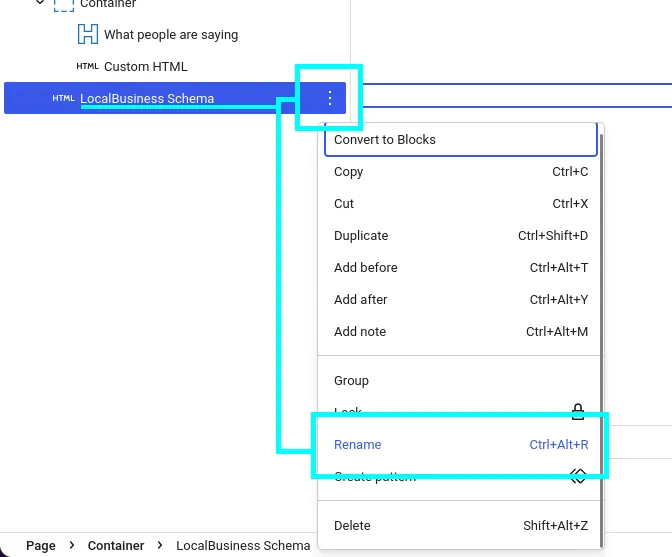
Important: This won’t render anything on your page – it will look like an empty block. That’s correct, because this is schema markup, not visible HTML elements. To make things clearer when you edit the page in the future, you can rename the CustomHTML block, like this:
Test, and then expand
The final thing to do is test… grab your website’s URL and run it through the Schema Validator: https://validator.schema.org/. That will tell you if there are any errors with the new code snippet.
When the Schema Validator has confirmed that the schema has no errors, you can run a final check with your AI assistant. Ask it to rescan your page and check that the schema matches what it thinks it should be.
Once your LocalBusiness schema is in place, you can start investigating other areas of your site that might benefit.
- Don’t try and use the schema to hide sneaky SEO phrases. The schema must be honest and match what’s on your site.
- Re-index your new schema-enriched pages with Google Search Console.
- Just because Google might not analyse a certain type of schema (e.g. a business service schema), doesn’t mean you shouldn’t add it. AI crawlers and agents can read schema too. So if you offer a management consultancy service, ask your AI assistant to create the proper schema for your “Management Consultancy Services” page.
To summarise…
Get your LocalBusiness schema implemented correctly, and tested. Re-index with Google Search Console, then explore the other types of suitable schema you might apply to your site.