

A small plugin I built to export user data and/or customer data from WordPress/WooCommerce. Great for extracting customer names and phone numbers.
The original query came from a client who wanted to export all their customers with name, email address and phone number. The built-in WooCommerce customer export function doesn’t include phone numbers, so I put this together.
What it does
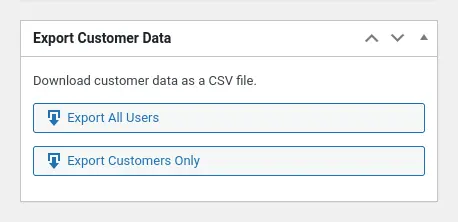
The plugin adds a dashboard widget with two export buttons:
- Export All Users
Every WordPress user account on the site - Export Customers Only
Just the users who’ve actually placed orders
Click either button and you get a CSV file with six fields by default:
- User ID
- First Name
- Last Name
- Email Address
- Billing Phone
- Shipping Phone
Features:
- HPOS compatible
Automatically detects and supports WooCommerce High-Performance Order Storage - No file storage
CSV generated in-memory and streamed to your browser - Pretty URLs
Clean download links like/wp-admin/exportwcd-reports/customers-only.csv - UTF-8 BOM
Excel handles non-ASCII characters correctly - Admin-only
Requiresmanage_optionscapability
No configuration screens, no bloated settings pages. Just a dashboard widget and two buttons.
How it works
The plugin queries your WordPress database directly—either wp_users for all users, or the WooCommerce orders table (with HPOS support) to identify customers. It builds the CSV on-the-fly in memory and streams it straight to your browser. No files are stored on the server.
The export URLs follow a clean pattern:
/wp-admin/exportwcd-reports/all-users.csv/wp-admin/exportwcd-reports/customers-only.csv
These require admin privileges to access, so there should be no risk of unauthorised exports.
Customising the export fields
The six default fields cover most use cases, but if you need different data you can customise the field mapping using a filter hook.
Here’s how you’d add a user’s login name and a custom phone meta field:
add_filter( 'export_woo_customer_data_fields', function( $fields ) {
    // Add username
    $fields['username'] = array(
        'table'  => 'users',
        'column' => 'user_login',
    );

    // Add custom meta field
    $fields['mobile'] = array(
        'table'    => 'usermeta',
        'meta_key' => 'mobile_phone',
    );

    // Remove shipping phone if you don't need it
    unset( $fields['shipping_phone'] );

    return $fields;
} );
Each field requires either:
- For
wp_userscolumns:tableset to'users'andcolumnset to the database column name (e.g.,'user_email','user_login','ID') - For user meta:
tableset to'usermeta'andmeta_keyset to the meta key name (e.g.,'billing_phone','first_name')
The field key (e.g., 'username', 'mobile') becomes the CSV column header.
Security and privacy
Because this plugin exports personal data (email addresses, phone numbers), there are a few things to keep in mind:
- Access control: Only admins can trigger exports (capability check on every request)
- No file storage: CSV is generated in-memory and streamed directly to the browser—nothing is saved on the server
- GDPR compliance: Ensure you have appropriate data handling policies and user consent before exporting customer data
- Download security: The exported CSV contains sensitive information, so store it securely and delete it when you’re done
Technical notes
The plugin is deliberately lightweight:
- No database tables
Uses existing WordPress/WooCommerce structures - No settings screens
Everything works out of the box - No external dependencies
Pure WordPress/WooCommerce code - Minimal resource usage
CSV generation uses streaming, cache suspension for large datasets, and skips unnecessary total count queries
What’s next
Future versions might include:
- Date range filtering (export customers who ordered in the last 30 days, etc.)
- Order status filtering (export only customers with completed orders)
- Scheduled exports via WP-Cron
- Email delivery of CSV reports
- WP-CLI command support
For now, though, it does one thing well: export customer data quickly and cleanly.