

A client needed a way to add Content Security Policy (CSP) headers to their WordPress site. Manually configuring strict CSP headers for scripts can be fiddly to get right, so I built a plugin to automate it.
The requirements were straightforward: proper script nonces, friendly with page caching and asset aggregation plugins, easy to set up (fire and forget), and testable before going live.
What it does
The plugin automatically generates and injects CSP headers with nonces for every page load. It processes your HTML output, adds nonce attributes to <script> and <style> tags, then sends a matching CSP header.
Features:
- Automatic nonce generation
Cryptographically secure nonce for every page load - HTML processing
Uses WordPressWP_HTML_Tag_Processorfor safe, fast HTML manipulation - Strict-dynamic support
Modern CSP with automatic script trust propagation - Report-Only mode
Test CSP without breaking your site - Cache-friendly
Works seamlessly with page caching and asset minification plugins - Flexible configuration
Settings page with granular control over CSP rules - Path exclusions
Skip CSP on specific URLs (checkout pages, admin tools, etc.) - Developer hooks
Programmatic control via filter hooks
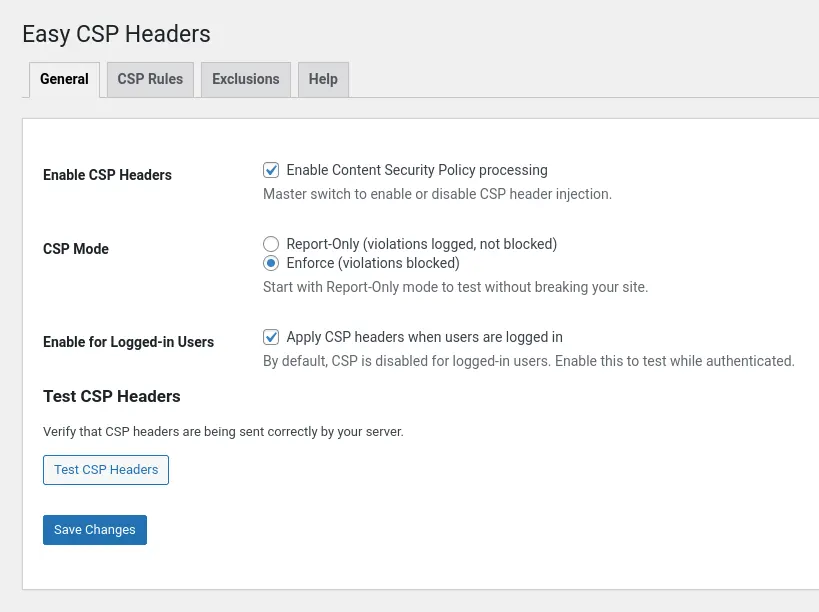
The plugin adds a settings page at Settings → CSP Headers with four tabs: General (enable/disable), CSP Rules (strict-dynamic, whitelisted domains), Exclusions (skip specific paths), and Help (documentation).
How it works
When a page loads, the plugin:
- Hooks into
template_redirectand starts output buffering - Generates a nonce using
random_bytes()and base64 encoding - Processes the HTML using
WP_HTML_Tag_Processorto add nonce attributes to script and style tags - Injects the CSP header with the matching nonce and your configured rules
- Returns the modified HTML to the browser
The CSP header looks something like this:
Content-Security-Policy: script-src 'nonce-abc123...' 'strict-dynamic'; style-src 'nonce-abc123...'; default-src 'self'
With strict-dynamic enabled (recommended), any script loaded by a nonce-trusted script is automatically trusted. This means if your main script loads jQuery from a CDN, that CDN script is allowed without having to whitelist the domain manually.
The nonce is regenerated on every page load, but because the plugin works at the output buffer level, it’s compatible with page caching. Both the HTML (with nonces) and the CSP header are cached together.
Report-Only mode
Start by using Report-Only mode. This sends a Content-Security-Policy-Report-Only header instead of enforcing the policy. Your site functions normally, but the browser logs CSP violations to the console.
Open the browser console (F12), reload the page, and check for violations. Look for things like this:
- Inline event handlers (
onclick="...",onload="...") — These are blocked by strict CSP - External scripts from CDNs not whitelisted — Add them to the whitelist or let
strict-dynamichandle them - Legacy code that injects inline scripts dynamically — May need refactoring
Once you’ve addressed violations (or excluded problematic pages), switch to Enforce mode.
Customising CSP rules
Whitelisted domains
If you’re loading scripts from specific external domains and don’t want to rely on strict-dynamic, add them to the whitelist:
https://cdn.example.com
https://another-domain.net
These get added to the script-src directive.
Custom directives
Add additional CSP directives in the “Custom CSP Directives” field:
img-src https: data:; font-src 'self' https://fonts.gstatic.com;
These are appended to the CSP header as-is.
Report URI
Configure a URL to receive violation reports:
https://yoursite.com/csp-report-endpoint
The browser will POST JSON violation reports to this endpoint. You’ll need to implement the endpoint yourself (or use a third-party service like report-uri.com).
Path exclusions
Some pages shouldn’t have CSP applied—checkout pages with third-party payment widgets, admin tools that inject inline scripts, etc.
Add paths to the exclusion list (one per line):
/checkout
/cart
/my-account/*
Supports exact matches and wildcards (*). The plugin won’t process CSP for these URLs.
Developer hook
For programmatic control, use the ecsp_should_skip_csp filter:
add_filter( 'ecsp_should_skip_csp', function( $skip ) {
    if ( is_singular( 'my_custom_post_type' ) ) {
        return true;
    }
    return $skip;
} );
Common issues
Inline event handlers
CSP blocks inline event handlers like onclick="handleClick()". The modern approach is to use addEventListener():
<!-- ❌ Blocked by CSP -->
<button onclick="handleClick()">Click Me</button>

<!-- ✅ CSP-friendly -->
<button class="my-button">Click Me</button>
<script nonce="...">
  document.querySelector('.my-button').addEventListener('click', handleClick);
</script>NOTE: If you absolutely need inline handlers and can’t refactor, enable “Use Unsafe-Hashes” in the CSP Rules tab. This is less secure but allows inline event handlers to execute.
Third-party plugins
Some plugins inject inline scripts that violate CSP. Options:
- Exclude the page: Add the URL to path exclusions
- Refactor the plugin: Update it to use external scripts with nonces
- Use Report-Only: Let the plugin run and just monitor violations
- Enable unsafe-hashes: Last resort, reduces security
Caching
The plugin works with page caching. The nonce is generated when the cache is built and remains consistent until the cache is cleared. If you change CSP settings, clear your cache (both page cache and CDN cache if applicable). In short – it’s not a built-in WordPress time-limited nonce.
Security notes
CSP is a powerful security layer. It prevents:
- Cross-site scripting (XSS) attacks by blocking untrusted scripts
- Clickjacking via frame-ancestors directive
- Data exfiltration by controlling which domains can be contacted
The plugin uses cryptographically secure nonces (random_bytes()) and processes HTML safely with WP_HTML_Tag_Processor. It doesn’t query the database on the frontend and doesn’t store data—everything happens in memory during output buffering.
Technical notes
The plugin is deliberately lightweight:
- No database tables: Settings stored in
wp_options, no custom tables - No frontend queries: All processing happens in-memory during output buffering
- WordPress 6.4+ requirement: Uses built-in
WP_HTML_Tag_Processorfor HTML manipulation - PHP 8.0+ requirement: Type safety throughout
- WordPress Coding Standards: PHPCS verified, follows best practices
Architecture:
- CSP_Processor: Generates nonces, processes HTML, injects headers
- Output_Buffer: Captures output at
template_redirect - Settings: Manages options storage and retrieval
- Admin_Hooks: Settings page, admin notices, help tabs
The plugin uses output buffering to capture HTML before it’s sent to the browser. This means it should work with any theme or plugin.
What’s next
Future versions might include:
- Built-in CSP violation reporting endpoint (store violations in a custom table)
- Dashboard widget showing recent violations
- WP-CLI commands for testing CSP rules
- Automatic inline event handler migration tool
- Integration with security plugins (Wordfence, iThemes Security)
For now, though, it does one thing well: automatically generate and inject CSP headers with minimal configuration.