

If you run a WooCommerce website outside the USA, you probably need to add a tariff (tax) to all orders that ship to the USA. WooCommerce can do this with built-in functionality, and we can give the tax an appropriate name with a small code snippet.
Set up the tax rate
At the time of writing (October 2025) the UK-to-USA tariff is set at 10%, so we create a standard tax rate in WooCommerce > Settings > Tax like this:
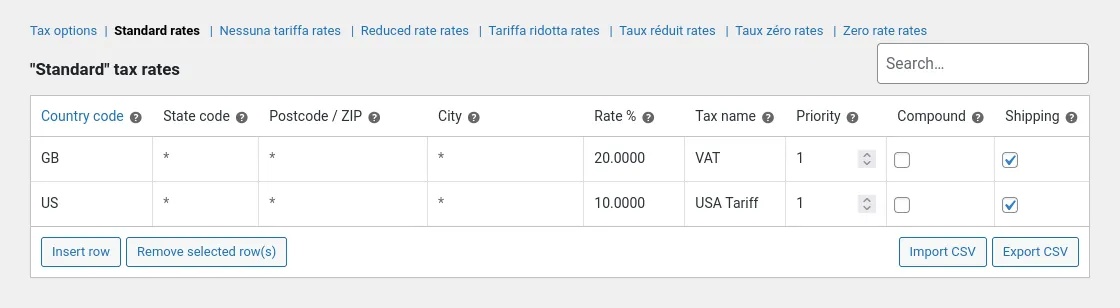
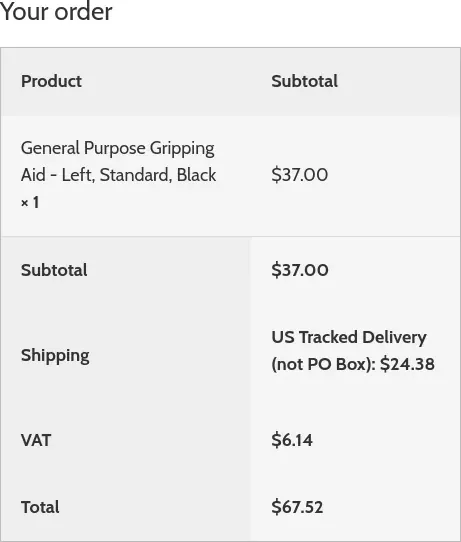
When we take an order to the checkout with USA set as the shipping address, Woo calculates the new tax rate. Although the numbers look correct, the order summary looks weird because it doesn’t use our tax name.
Rename the tax line with a code snippet
We can fix this with a few lines of PHP. Edit your child theme’s functions.php file and add the following snippet:
/**
 * Relabel the USA tax rate as a tariff.
 */
function custom_tax_or_vat( $label ) {
	if ( ! function_exists( 'WC' ) ) {
		// WooCommerce is not installed?
	} elseif ( empty( ( $customer = WC()->customer ) ) ) {
		// No customer data have been set - no change.
	} elseif ( $customer->get_shipping_country() !== 'US' ) {
		// Shipping country is not USA - no change.
	} else {
		$label = 'USA Tariff';
	}

	return $label;
}
add_filter( 'woocommerce_countries_tax_or_vat', 'custom_tax_or_vat', 10, 1 );
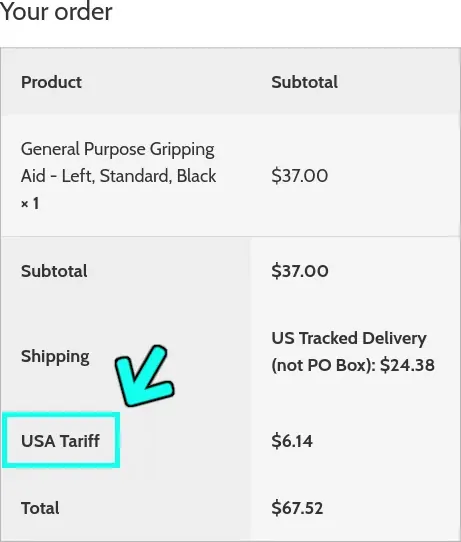
The order summary makes more sense to the customer now, and it comes through to their email too.
A simple modification that brings any WooCommerce site up-to-date.